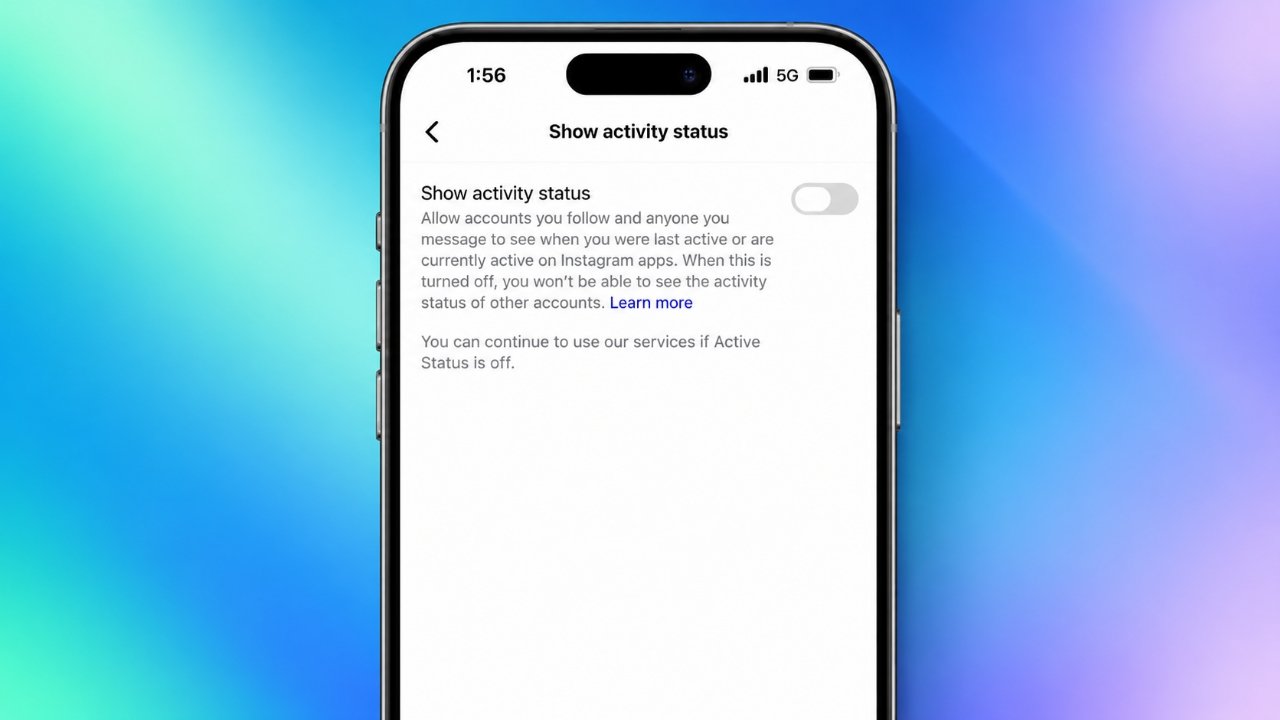
Instagram makes it easy to connect with friends, share content, and chat through direct messages. However, the platform also has a feature that lets eligible users see when you are online or when you were last active. If you prefer to keep this information private, disabling your Instagram Active Status can give you greater control over your online presence.
Whether you use an Android phone, an iPhone, or a computer, you can manage this setting through Instagram’s available privacy options. Here’s how to switch it off, what changes after disabling it, and which additional settings you can use to improve your privacy.
Also Read: How to Disable the Passcode on Your iPhone
What Does Active Status Mean on Instagram?
Active Status is an Instagram feature that indicates whether you are currently using the platform or were recently online. When the feature is enabled, eligible people may see a green dot beside your profile picture or a label such as “Active now” or “Active 10 minutes ago.”
This information is commonly displayed in Instagram’s messaging section. It can help people know when you might be available to chat, but it can also make your online activity more noticeable than you would like.
For example, you might want to watch Reels, explore new posts, or read your messages without letting others know when you are online. Disabling Active Status lets you limit this particular type of visibility.
Steps to Disable Instagram Active Status on Your Phone
You can turn off Active Status directly from the Instagram mobile app. The exact names or positions of certain menu options may vary depending on your app version.
Follow these steps:
- Open the Instagram app on your Android phone or iPhone.
- Tap your profile picture in the bottom-right corner.
- Select the three-line menu in the top-right corner.
- Open Settings and privacy.
- Look for Messages and story replies or a similar messaging-related section.
- Tap Show Activity Status.
- Switch off the option that allows others to see your activity status.
Once the setting is disabled, Instagram should no longer display your online indicator or last-active information through this feature to eligible users.
Can’t find the setting? Use the search function within Instagram’s settings, if available, and search for “Activity Status.” You can also check for app updates if the menu looks different from the instructions above.
How to Turn Off Active Status on Instagram Using a Computer
If you usually access Instagram through a desktop browser, you can check whether the activity status option is available in your account settings.
Here’s what to do:
- Visit Instagram’s official website.
- Sign in to your account.
- Open the main menu, usually located near the bottom-left corner.
- Select Settings or the relevant privacy and messaging options.
- Look for the activity status setting.
- Disable the option that allows other people to see when you are active.
Instagram occasionally updates its website layout, so the setting may appear in a different location or may not be available in the same form for every account. If you cannot locate it on your computer, try accessing the option through the mobile app.
What Changes After You Turn Off Active Status?
Turning off this feature affects how Instagram displays your online availability. However, it does not disable your account or prevent you from communicating with other users.
Here are the main changes to understand.
1. Other People Cannot See Your Activity Status
When Active Status is switched off, eligible users should no longer see your online indicator or your last-active information through this feature.
This can be helpful if you prefer to use Instagram without making your availability visible to people you follow or message.
2. You May Not Be Able to See When Others Are Online
Instagram generally links your ability to view other people’s activity status to whether your own status is enabled.
As a result, turning off Active Status also means you typically won’t be able to see other users’ online indicators or last-active information through this feature.
Your direct messages will continue to work normally.
3. You Can Still Send and Receive Direct Messages
Disabling Active Status does not stop people from sending you messages. You can continue chatting, reading conversations, and replying whenever you choose.
The difference is that other users have less information about whether you are currently online.
Keep in mind that this setting does not disable message notifications or prevent people from noticing other signs of activity.
4. Your Likes, Comments, and Story Views Are Not Automatically Hidden
One important point to remember is that Active Status only controls the visibility of your online availability through that specific feature.
Other interactions may still be visible according to Instagram’s normal functionality and your account settings. For example, people may be able to see your likes, comments, or story views where those details are normally accessible.
If you want to limit who can see your content or interact with you, you will need to review the relevant privacy settings separately.
Does Turning Off Active Status Make Your Instagram Account Private?
No. Hiding your activity status is not the same as making your Instagram account private.
Your profile information, posts, and interactions remain subject to your existing account settings. If you have a public account, people may still be able to access your public content even when your online status is disabled.
To improve your overall privacy, consider these additional options:
- Switch to a private account: This limits access to your posts and other protected content to approved followers, subject to Instagram’s features and exceptions.
- Review your followers: Remove followers you no longer want to have access to your private content.
- Use the Restrict feature: This can limit certain interactions with a specific account without blocking it outright.
- Use the Block feature: Blocking can prevent a selected account from accessing or interacting with you in ways Instagram supports.
- Review message controls: Adjust who can contact you and how message requests are handled.
Each option serves a different purpose. Choose the settings that best match the level of privacy you want.
Can You Hide Your Active Status From Just One Person?
Instagram’s standard Active Status control does not generally provide a simple option to hide your online status from one selected person while showing it to everyone else.
If you disable the feature, its visibility is reduced more broadly rather than being controlled separately for each person.
If your concern involves a particular account, consider reviewing your follower list, message settings, and available Restrict or Block options. These features offer different ways to manage unwanted contact and interactions.
How to Turn Your Instagram Active Status Back On
You can restore the feature whenever you want. There is no need to leave it disabled permanently.
To enable it again:
- Open Instagram and visit your profile.
- Tap the three-line menu.
- Navigate to Settings and privacy.
- Find the activity status option in the messaging or privacy settings.
- Turn on the setting that allows others to see your activity status.
After re-enabling it, your online availability may become visible to eligible users again.
You can switch between these options whenever your preferences change. Just remember that the setting controls activity-status visibility, not every aspect of your Instagram presence.
Frequently Asked Questions
Does Instagram notify people when I turn off Active Status?
Instagram does not generally send a notification to other users when you disable this setting. However, they may notice that your online indicator or last-active information is no longer available.
Can I still use Instagram normally with Active Status turned off?
Yes. You can browse posts, watch Reels, send messages, comment on content, and use other standard features. Disabling Active Status primarily changes the visibility of your online availability.
Does turning off Active Status hide my last-seen time?
Yes, the setting is intended to stop eligible users from seeing your last-active information through Instagram’s Active Status feature.
Will my followers know when I am online?
With Active Status disabled, eligible users should not see your online indicator through this feature. However, your visible interactions may still provide clues that you have used Instagram.
Can I hide my online status without disabling messages?
Yes. Active Status and direct messaging are separate functions. You can turn off your activity indicator while continuing to send and receive messages.
Is Active Status turned off automatically for private accounts?
A private account and Active Status are separate privacy controls. Making your account private does not necessarily disable your activity status. Check the activity status setting directly to confirm its current state.
Also Read: How to Change Your Twitch Profile Picture
Final Thoughts
Turning off Active Status on Instagram is a straightforward way to reduce the visibility of your online activity in 2026. Once disabled, eligible users should no longer be able to see when you are online or when you were last active through this feature.
The change does not prevent messages, conceal all your interactions, or make your entire account private. Instead, it gives you more control over one specific part of your online presence.
For a more private Instagram experience, review your activity status alongside your account visibility, follower list, and messaging preferences. These small adjustments can help you use the platform more comfortably while keeping control over the information you share.
Advertisements